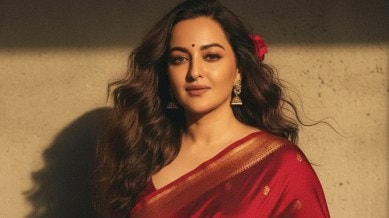
Imagine turning a simple selfie into a glamorous Bollywood poster from the 90s, where you’re draped in a stunning saree with flowing hair and golden lighting. That’s exactly what the Google Gemini AI Nano Banana Saree trend is all about! This viral craze, exploding across Instagram, X, and TikTok in September 2025, uses Google’s Gemini AI tool—specifically its “Nano Banana” image-editing feature—to transform your photos into nostalgic, retro-style portraits. You can look like a classic Bollywood star in a chiffon saree, complete with vintage vibes, dramatic backdrops, and cinematic charm.
The trend is super popular among Gen Z and millennials who love blending Indian fashion with modern tech. Whether it’s a pastel pink saree fluttering in the wind or a bold black polka-dot look, this AI tool makes it easy for anyone to create and share their Bollywood-inspired masterpiece. But it’s not just fun—there’s also some buzz about privacy concerns, which we’ll cover later. Let’s dive into what makes this trend so special and how you can join in!
Why Is It Called “Nano Banana”?
The name “Nano Banana” sounds quirky, right? Here’s the breakdown:
- Nano: This refers to the lightweight, fast version of Google’s Gemini AI model, designed to work smoothly on phones and browsers.
- Banana: It’s a fun, unofficial nickname that early users gave to the tool. Some say it’s because the AI “peels back layers” of your photo to create something new, like peeling a banana. Google hasn’t officially explained the name, but it’s catchy and stuck!
The Nano Banana feature is part of Gemini’s image-editing tools (powered by Gemini 2.5 Flash Image) and is free to use through the Gemini app or Google AI Studio, with a limit of up to 100 image generations per day. It’s perfect for creating quick, creative edits without needing fancy software.
Why Is This Trend So Popular?
The Nano Banana Saree trend has taken social media by storm for a few reasons:
- Nostalgia Vibes: It brings back the magic of 90s Bollywood, with its dreamy sarees, dramatic poses, and vintage film poster styles.
- Easy to Use: You don’t need to be a tech expert or a designer—just a selfie and a few words to describe your dream look.
- Shareable Fun: The results are so eye-catching that they’re perfect for Instagram Reels, Stories, or X posts, especially with hashtags like #NanoBananaSaree or #AIBollywoodLook.
- Festive Timing: With Diwali 2025 around the corner, people are using it to create festive saree looks for virtual celebrations.
- Creative Freedom: You can experiment with endless saree styles, colors, and backdrops, from retro to modern.
It’s not just about sarees either—some users are creating spin-offs like “Nano Banana Lehenga” or even “Hug My Younger Self” edits, where the AI adds emotional, nostalgic touches to photos.
How to Create Your Own Nano Banana AI Saree Image
Ready to try it? You don’t need any special skills or equipment—just a phone or computer, a good selfie, and a little creativity. Follow these simple steps to create your Bollywood saree masterpiece:
Step 1: Access the Gemini AI Tool
- On Mobile: Download the Google Gemini app from the App Store (iOS) or Google Play Store (Android). Sign in with your Google account.
- On Desktop: Visit gemini.google.com or Google AI Studio in your browser.
- Look for the “Image Editing” section or a button labeled “Try Nano Banana” (it might be under experimental features).
Step 2: Upload a Clear Selfie
- Choose a high-quality, solo selfie where your face is clearly visible. Good lighting (natural or soft) works best.
- Avoid group photos, blurry images, or heavily filtered selfies, as they can confuse the AI and lead to weird results.
Step 3: Write a Detailed Prompt
- In the text box, describe exactly how you want your saree look. Be specific about the saree type, color, background, and vibe.
- Example: “Transform my selfie into a 90s Bollywood poster: me in a flowing pastel pink chiffon saree, golden-hour lighting, soft grainy texture, vintage film reel style, dramatic wind-swept hair.”
- Click “Generate” and wait 5-10 seconds for the AI to work its magic.
Step 4: Refine and Share
- If the result isn’t perfect, tweak your prompt (e.g., change the saree color or lighting) and try again.
- Once you love it, download the image and share it on social media with #NanoBananaSaree to join the trend.
- Pro Tip: Save a few versions to compare and pick the best one!
Top 5 Viral Prompts for Stunning Saree Looks
Here are some popular prompts inspired by trending posts on X and Instagram. Copy them or tweak them to match your style:
- Classic Chiffon Saree
Prompt: “Convert this selfie into a 90s Bollywood movie poster: me in a flowing pastel pink chiffon saree, golden-hour lighting, soft grainy texture, vintage film reel style, dramatic wind-swept hair.”
Result: A romantic, ethereal portrait with warm tones and subtle floral accents, like a scene from a Shah Rukh Khan movie. - Polka-Dot Glam
Prompt: “Retro 80s Indian cinema vibe: edit me wearing a black polka-dot saree with a fitted blouse, pearl jewelry, posed against a sunset backdrop, high contrast, vintage filter.”
Result: A bold, glamorous look inspired by Madhuri Dixit or Sridevi. - Floral Elegance
Prompt: “Convert to 4K HD 70s Bollywood actress: long wavy hair, translucent red saree draped over one shoulder, white flowers in hair, elegant blouse, warm wall background, dramatic side lighting.”
Result: A timeless, cinematic portrait with a touch of mystery. - Modern Minimalist
Prompt: “Modern Bollywood star look: me in a sleek white saree with silver embroidery, minimalist blouse, standing against a city skyline at dusk, soft focus, vibrant colors.”
Result: A chic, contemporary vibe with urban flair. - Vintage Black and White
Prompt: “Classic 60s Bollywood style: edit me in a black saree with sequins, short-sleeve blouse, posed in a black-and-white film frame, soft spotlight, retro grainy texture.”
Result: A dramatic, monochrome masterpiece like an old Bollywood classic.
Tip: Always start your prompt with “Convert this image into…” or “Transform this selfie into…” to guide the AI. Play with colors like yellow, emerald, or royal blue for unique looks.
Common Mistakes to Avoid
To get the best results, steer clear of these beginner errors (based on user feedback from X and Instagram):
- Blurry Photos: Use a high-resolution selfie (at least 720p) to avoid distorted faces or sarees.
- Vague Prompts: Don’t just say “saree pic.” Be specific about colors, fabrics, and lighting, like “translucent yellow chiffon saree with golden embroidery.”
- Over-Editing: Regenerating too many times can make the image look unnatural. Stick to 2-3 tries.
- Group Shots: The AI works best with solo photos. Group images often lead to mixed-up faces or outfits.
- Poor Lighting: If your selfie is too dark or overexposed, the AI might struggle to add realistic details.
The Buzz and Controversy Around the Trend
Why It’s Going Viral
The Nano Banana Saree trend is everywhere in September 2025:
- Massive Reach: Millions of users have shared their AI saree edits on Instagram Reels, Stories, and X posts, with #NanoBananaSaree trending globally.
- Celebrity Love: Bollywood influencers and even small-town creators are jumping in, making it a cultural hit.
- Festive Fever: With Diwali approaching, people are using these edits to plan festive looks or create virtual avatars for celebrations.
- Fun Spin-Offs: Beyond sarees, users are experimenting with lehengas, anarkalis, or even retro suits, keeping the trend fresh.
The Privacy Concerns
Not everything is perfect, though. Some users have raised eyebrows about the AI’s behavior:
- Creepy Details: An Instagram user went viral after claiming the AI added a personal detail (like a mole on her shoulder) that she never mentioned in her prompt. This sparked debates about how Google’s Gemini model is trained and whether it pulls data from user profiles.
- Data Worries: Experts warn that uploading personal photos to AI tools could risk data privacy. To stay safe, consider using a generic selfie or one without identifiable features.
- Google’s Silence: Google hasn’t addressed these claims yet, but they’ve emphasized that the Gemini app follows standard privacy policies.
If the privacy concerns make you hesitant, you can try alternative AI tools like ChatGPT’s image-editing features or Canva’s AI suite, which offer similar Bollywood-style edits with different prompts.
Tips to Make Your Nano Banana Saree Edit Stand Out
Want your edit to shine on social media? Try these tricks:
- Match Lighting: If your selfie has natural light, mention “golden-hour lighting” or “soft daylight” in the prompt for realistic results.
- Add Accessories: Include details like “pearl earrings” or “bangles” to make the look authentic.
- Experiment with Eras: Try 60s, 80s, or 2000s Bollywood vibes for variety.
- Use Reels: Pair your image with a retro Bollywood song (like “Tujhe Dekha To” from DDLJ) for viral appeal.
- Check the Background: Specify backdrops like “sunset,” “vintage wall,” or “floral garden” to set the mood.
Alternatives to Google Gemini AI
If you’re not sold on Nano Banana or want to compare, here are other tools to try:
- ChatGPT Image Editing: Use DALL·E-powered features with similar prompts for Bollywood-style saree edits.
- Canva AI: Canva’s Magic Studio offers user-friendly image transformations with saree templates.
- Fotor AI: A free online tool with Bollywood-inspired filters and easy prompts.
These might not have the “Nano Banana” charm but can still deliver stunning results.
Final Thoughts: Join the Bollywood Glam Party!
The Google Gemini AI Nano Banana Saree trend is a perfect mix of tech, culture, and creativity. Whether you’re dreaming of a flowing chiffon saree or a bold retro look, this tool lets you channel your inner Bollywood star in minutes. It’s fun, free, and super shareable—perfect for Diwali 2025 or just to spice up your social media feed.
So, grab your best selfie, try one of the prompts above, and share your creation with #NanoBananaSaree. What’s your dream saree style—classic pink chiffon or dramatic black sequins? Let us know, and happy editing!
Click Here To Follow Our WhatsApp Channel
You Might Also Like:
How Sufiyan Muqeem Is Pakistan’s New Spin Game-Changer
Pakistan Women vs South Africa Women: ODI Series Kicks Off with World Cup Dreams
Operation Sindoor: JeM Commander’s Shocking Admission Exposes Masood Azhar’s Family Loss